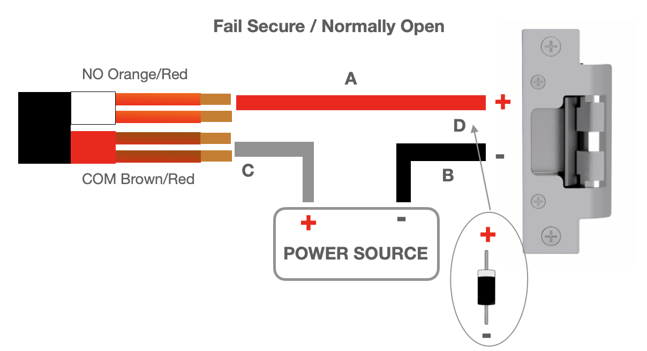
There is no current flowing through the relay on the Fail Secure lock. When the relay is activated, the current flow is opened, and the door lock will open. If the power supply is cut off due to a power failure or an external factor, the door will remain closed.
Important Notice 1: Incorrect installation of the diode as per the specifications outlined in step 4 of this guide will result in damage not immediately visible on the equipment but will void its warranty. Please adhere strictly to the instructions in step 4 to prevent any adverse impact on the device warranty.
Follow these steps to properly wire the Anavio Reader to a Fail Secure electric lock:
- Connect both NO (Orange/Red) wires to the positive (+) wire on the lock.
- Connect the two COM (Brown/Red) wires to the positive (+) terminal on the power source.
- Attach the negative (-) wire from the power source to the negative (-) terminal on the lock.
- When installing the Anavio Reader, use the provided diodes on each side of the door lock wiring, ensuring correct placement next to the door lock (avoid installation on power sources or device wiring) and proper soldering (splicing won't suffice) to protect the relay from voltage backflow during door lock operations. Improper installation may lead to random failures (LED, device, or communication issues) at unspecified intervals (2 hours to 2 weeks), potentially causing permanent damage to the device. Note that diodes are applicable only in DC circuits.
Important Notice 2: Each wire can support up to 1A of current. By connecting them together, the circuit can handle up to 2A of current. Refer to your lock’s manufacturer documentation to confirm that the maximum load capacity of your lock does not exceed the circuit's capacity; otherwise, you might damage the device and void the warranty.
Note: For configuring the relay and door lock settings in your access control system, please review the Door Management Documentation. This provides clear instructions on how to set up and adjust the relay and door settings within the software to ensure proper functionality and security.