Exit buttons, also known as Request-to-Exit (REX) buttons, are an essential part of access control systems, providing a way for authorized users to exit a secured area without requiring a credential or access card. When connecting an Exit/REX button to your Anavio Reader or access control system, follow the manufacturer's wiring and configuration instructions to ensure proper functionality. A properly connected Exit/REX button helps maintain security while allowing authorized users to easily and safely exit a secured area.
Follow these steps to properly wire the Anavio Reader to an Exit/REX Button:
- Locate the set of wires with black shrink tubing.
- Connect the Input 1 (Green/Yellow) wire to the positive (+) wire on the exit button.
- Connect the Ground (Brown/Yellow) wire to the negative (-) wire on the exit button.
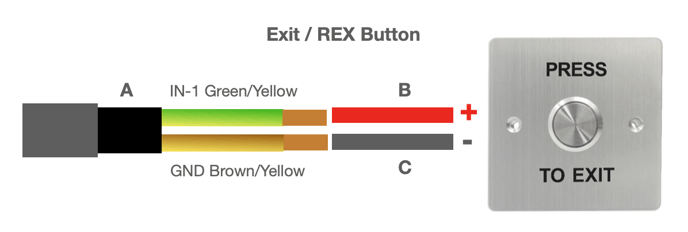
Note: To configure the Exit/REX button in your access control system, please review the Anavio Software User Guide. This guide provides clear instructions on how to set up and adjust the Exit/REX button settings within the software to ensure proper functionality and security